Showing posts with label radio. Show all posts

Thursday, April 08, 2010

Combo station urls

In this blog post I'll tell you how to create Last.fm combo station urls. Last.fm station urls always start with "lastfm://". For combo station urls, an example might look like
lastfm://rql/dGFnOnBvcCBub3Qgc2ltYXJ0OiJMYWR5IEdhZ2Ei
See that long character string after rql/ ? That is just simple Base64 encoding and RQL means "Radio Query Language". If you'd use a decoder like this one,it will decode to
tag:pop not simart:"Lady Gaga"
So, there are key-value pairs and logical connectors (valid ones are 'and', 'or' and 'not'). The above query means "play everything in direction of 'pop' tag, but not Lady Gaga's similiar artists". I think you got the idea...
The point I did not mention yet is that there are some nice options available. Let's change our query a bit:
tag:pop not simart:"Lady Gaga" opt:mainstr|0.55 opt:rep|0.6 opt:discovery|true
Huh? Lots of opt(ions)! mainstr stands for "Maintream", where the value range is from 0-1(0% to 100%). The less the value, the more unknown artists will occur in your station. Same goes for rep(etition), but in this case you can control the artist(or track?) repetition rate. I think "discovery" is kind of self-explanatory(discovery mode on/off). Here you got a nice table with names, values and descriptions:
NameValueDescription
user[username]personal station
library[username]a users library
loved[username]loved tracks of user. After Nov 17 2010 this station is not available anymore!
rec[username]recommendations for a user
neigh[username]neighbour radio of user
ptag[tag of user]|[username]Personal tag radio of a user. The '|' is NO or!. After Nov 17 2010 this station is not available anymore!
playlist[playlist-id]A playlist station. Use user.getPlaylist API call to get playlist id's of a user's playlist. After Nov 17 2010 this station is not available anymore!
adv[username]Play a user's mix radio.
simart"[artist name]"Similiar artists of an artist. Keep the quotes around.
tag[tag]Global tag radio
group"Group Name" or [groupid]Group radio
opt:rep|[0-1](default: 0.5)Specifies the track repetition, means how long it will take until the track is played again
opt:mainstr|[0-1] (default: 0.5)Type of tracks played(obscure to popular)
opt:discovery|[true|false] (default: false)Discovery mode on/off
Note that the options are all optional and thus have a default value. Connect name and value with a ':', except for the opt: values. If a value contains a space, it must be enclosed with double-quotes(""). Known Issues
  • Discovery mode is subscribers only.
  • In the Base64 RFC specification there is a space after 76 characters in the encoded string. Apparently the web and the desktop client cannot handle this space, so you have to remove it and everything will work fine.
Have fun with constructing the urls and implementing it in your app!
Very much thanks to Norman (nova77LF)(glorious creator of the Radio Query Language) for clarification on some points :)

Sunday, March 21, 2010

Testing the next generation Last.fm client

Note: The software shown is in pre-alpha status and might change any time.

This morning I was just wondering what to do with this wonderful day. So I had a great breakfast with some cooked eggs, a cup of coffee, some corn flakes, watched some TV and took a bath afterwards. But what to do then? Start a new Java project...uhm I coded all week long, but the sun does not shine that much outside.

So lets install the current last.fm client from github. At this point, a big green plus to the programmers at Last.fm for putting the whole last.fm desktop software of the git repository(which includes the radio player, too) under GNU General Public License. Thats awesome!
Looking at the Network graph, I saw that eartle has the most recent version. As I am not familiar to git yet, I lauched a console and typed "man git" and read the manual of git.
Afterwards I did
mkdir ~/lastfm
cd ~/lastfm
git clone git://github.com/eartle/lastfm-desktop.git
So far, so good. After trying the normal compile way (./configure && make) I ran into some errors.
I read the README's, installed the missing packages and additionally I got liblastfm via "git clone git://github.com/eartle/liblastfm.git". I compiled the latter(you have to install some additional packages) and gave the last.fm client a try. It failed with an error that "boost" could not be found. I googled a bit and did
sudo aptitude install libboost-dev
Eventually you have to install boost-build, too. Tried again, failed again, this time for something called "yajl"(Yet another JSON library". Too bad the package is only included in the new Ubuntu 10.04. But I did not want to wait one month for the next version, so I downloaded the source via
$ git clone git://github.com/lloyd/yajl
I compiled it, then switched to the lastfn-desktop folder and compiled successfully:
cd ~/lastfm/lastfm-desktop
./configure
make
Then I tried to launch "./_bin/radio", but it did not find some librarys. I guess the way I fixed it was really dirty(copied the required librarys to /usr/lib) and I will undo that and try a better way next time.


The client

From console, I ran
cd ~/lastfm/lastfm-desktop/
_bin/radio -stylesheet app/radio/radio.css &
Main window
Main window
It has everything to satisfy your needs. Looks quite simple, but is very effective in functionality.
Hybrid stations
Hybrid stations
You can mix up up to three different stations, like your recommendations, Meat Loaf's similar artists and the contents of a plalist. Awesome feature!
Hybrid stations advanced
Hybrid Stations advanced
If you check "Show options" you can connect your selected stations with words like 'and','or' and 'not', so you could do something like "play my radio station and the chillout tag, but not Lady Gaga".
Now playing
Now playing
Shows the currently playing track, has all needed buttons. Tag and share are inside the dropdown arrow at the lower right corner.
Station settings
Playback options
More popular or more obscure? You decide. You cannot only select the popularity of the artists you want to to listen to, but also how often they should repeat(in percent).
The tagging window
The tagging window
The tagging window is awesome, you can drag tags directly into the text box on the right. Too bad it currently always displays the wrong track.
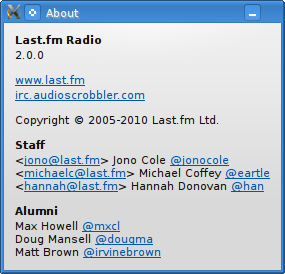
About window
About window
So do not tell me I would tell you fairy tales ;)

One word on functionality before finishing: The client is still pre-alpha, plaback often just stops, stays silent and then continues after a couple of minutes.

As I am a curious guy(especially regarding the API), I wondered about those lastfm://rql/somelongstring URL's in the console output and took a look at the source(horray to GPL :) ). What I disovered? Its the station url for the hyrbid stations...