In the students home where I lived, a bar was openened yesterday and I had to put some professional audio equipment there which I lend from a good friend of mine. It was a very big success and my first time I was the DJ, but people sung and danced 8-)
Because the whole equipment, means the amp rack, 2 top speakers and one huge subwoofer of exactly the size of an ground loop. I assume my computers power supply unit is responsible for that (its been actually 20 Euros, which was really cheap for 420 Watts some years ago).
Today I luckily found a very nice solution around this issue: My work laptop does not produce a ground loop, so it is predestinated for a PC to amplifier rack connection. On my main PC I use foobar2000 (there is no good linux alternative and sadly, I'm on windows again for some reason). So I found edcast which is capable of streaming to Shoutcast and IceCast from foobar(it's actually a DSP plugin). Because I hate Winamp and Icecast is OSS, I used the latter. Now it nicely streams my foobar playlists to the VLC media player of the laptop. Theres a control delay of about 5 seconds, but regarding the point that the audio gets ogg encoded and VLC buffers 1200 ms, I'm really fine with that.
Now the whole students home has to listen to the music I like, it is very loud in my room now. I even changed my IM status message to "Students home now listening to [track] by [artist]"...
Wednesday, May 12, 2010

Tuesday, April 13, 2010
Goodbye Windows, welcome Kubuntu
Yesterday I discovered that my Windows 7 RC1 reboots all 2 hours(which I already had expected) and there was a Kubuntu 9.10 CD lying on my desktop. As I successfully use it on my company's laptop with no issues, I decided its the right time to install it for my private everyday use, too.
Said and done. But after installing the nvidia drivers plus a dist-upgrade, KDE won't show anymore and I discovered it was not 64-Bit. Jens recommended me to try Kubuntu Lucid Lynx (10.04 beta 2) and now I am a really happy and satisfied Kubuntu user.
The installation process itself was quite laggy, but finally it worked fine, including current Firefox and Thunderbird (yeah, finally 3.0). Before I did anything other, I searched for proprietary graphics drivers (for my NDVIA card) via the "Hardware Drivers" utitly of KDE. Surpise, surprise, everything already set up and running fine! WLAN - no problem. Sound over S/PDIF - no problem(just push up the digital device in Multimedia settings for all media types).
When it came to S/PDIF for VideoLAN player, it costed me some time, but finally I just tried setting the sampling frequency to 48000 and it worked fine again :)
Then a pidgin here, a KsCD there, all fine.
I even installed a really cool game called Kobo Deluxe (a 2D space shooter) which ran without any issues!
It came me into mind that the (K)ubuntu logo, the nice-looking ring, could be a wedding ring: Once you get first familiar and then married with Ubuntu Linux, you won't be able to betray it - it's just to awesome to really going back to windows :D
Besides Windows 7 costs about 85 Euro for Home Premium with nearly no usable software(okay except Media Center maybe) and with Ubuntu (and other Linux distributions) you can get everything for free, can take a look at the source, report bugs which are quickly solved in most cases and there's so many free software available in places where the appropiate windows replacement would cost hundreds of dollars. Just think about The GIMP vs. Adobe Photoshop...
Just COOOL! 8-)
Said and done. But after installing the nvidia drivers plus a dist-upgrade, KDE won't show anymore and I discovered it was not 64-Bit. Jens recommended me to try Kubuntu Lucid Lynx (10.04 beta 2) and now I am a really happy and satisfied Kubuntu user.
The installation process itself was quite laggy, but finally it worked fine, including current Firefox and Thunderbird (yeah, finally 3.0). Before I did anything other, I searched for proprietary graphics drivers (for my NDVIA card) via the "Hardware Drivers" utitly of KDE. Surpise, surprise, everything already set up and running fine! WLAN - no problem. Sound over S/PDIF - no problem(just push up the digital device in Multimedia settings for all media types).
When it came to S/PDIF for VideoLAN player, it costed me some time, but finally I just tried setting the sampling frequency to 48000 and it worked fine again :)
Then a pidgin here, a KsCD there, all fine.
I even installed a really cool game called Kobo Deluxe (a 2D space shooter) which ran without any issues!
It came me into mind that the (K)ubuntu logo, the nice-looking ring, could be a wedding ring: Once you get first familiar and then married with Ubuntu Linux, you won't be able to betray it - it's just to awesome to really going back to windows :D

Besides Windows 7 costs about 85 Euro for Home Premium with nearly no usable software(okay except Media Center maybe) and with Ubuntu (and other Linux distributions) you can get everything for free, can take a look at the source, report bugs which are quickly solved in most cases and there's so many free software available in places where the appropiate windows replacement would cost hundreds of dollars. Just think about The GIMP vs. Adobe Photoshop...
Just COOOL! 8-)
Thursday, April 08, 2010
Combo.fm or how I learned to really love last.fm
In a recent post I wrote about the new client and combo stations(plus some technical details in the last one).
What is a combo station? A combination of last.fm radio stations, which are coonnectable by using "and", "or" and "not" (plus some nifty extra options, I'll come back to that point later on).
As it took always a very long time to create those combo station urls by hand, I wrote a nice application(which seems to be stable, but also may contain bugs). So I'd like to introduce you into Combo.fm, as I call it. Written in pure Java, using NetBeans(too bad it's not eclipse, but NB has the better GUI creator :P) and the best thing: GPL license(with the restriction of non-commercial use) and source included :) Note that the Last.fm API bindings for Java by JRoar are used, you can also obtain a fresh copy from http://code.google.com/p/lastfm-java/
But I guess you came here because you want to listen to combo stations, so click the link below(sorry for hosting on RS, had no better place atm):
Download Combo.fm
You can run it via "java -jar ComboFm.jar" from the ComboFm/dist/ folder from your OS console. (Hopefully a linux distibution :P)
For Windows users:
Usage instructions
Basically you just select a station type on the top left, select or type a value at the combo box beneath and hit "Add->". If you want to change the logical connector, you can just select the station on the right from the list box and select another(like 'and' or 'not'). Thereby, you can ignore the 'or' of the last item(tiny UI bug, doesn't affect the result). Don't worry if you added a station by mistake, you can just hit "Remove" to remove the selected station from the list.
Now let's concern with the sliders and the checkbox at the middle left.
Mainstream controls the amount obscure/mainstream music you want to listen to(left = 100% obscure, right = 100% mainstream). Setting this to 100% obscure will result in an interesting station.
Web browser url:Paste direcly in your browser's address bar and hit return.
Radio client url:Listen to the station with your favourite Last.fm client.For desktop client, paste the url in the text box of the player's start screen(where you tune into stations) an hit play.
My Personal opinion is that combo stations drastically improve the listening experience of the Last.fm radio, even if you only play with the sliders you can listen to very awesome tracks you didn't knew yet or of which you forgot the name a very long time ago. Good Job, Last.fm. I really love it!
And to you, dear reader:
Happy listening! I hope you enjoy Combo.fm right in these minutes.
Note: Combo stations is a pre-alpha feature of Last.fm, so you take the consequences if you use Combo.fm for listening to these stations! I am not responsible for what you do and cannot take any risks resulting in the usage of Combo.fm.
What is a combo station? A combination of last.fm radio stations, which are coonnectable by using "and", "or" and "not" (plus some nifty extra options, I'll come back to that point later on).
As it took always a very long time to create those combo station urls by hand, I wrote a nice application(which seems to be stable, but also may contain bugs). So I'd like to introduce you into Combo.fm, as I call it. Written in pure Java, using NetBeans(too bad it's not eclipse, but NB has the better GUI creator :P) and the best thing: GPL license(with the restriction of non-commercial use) and source included :) Note that the Last.fm API bindings for Java by JRoar are used, you can also obtain a fresh copy from http://code.google.com/p/lastfm-java/
But I guess you came here because you want to listen to combo stations, so click the link below(sorry for hosting on RS, had no better place atm):
Download Combo.fm
You can run it via "java -jar ComboFm.jar" from the ComboFm/dist/ folder from your OS console. (Hopefully a linux distibution :P)
For Windows users:
- Create a file named "runComboFm.cmd" inside the folder to where you unextracted Combo.fm
- Open it with Notepad(right click -> Open With -> > Notepad/Editor)
- Paste the following code:
@echo off
java -jar ComboFm/dist/ComboFm.jar - Save file, close Notepad and run the file by double-clicking on it.
- Have fun ;)
Usage instructions
Basically you just select a station type on the top left, select or type a value at the combo box beneath and hit "Add->". If you want to change the logical connector, you can just select the station on the right from the list box and select another(like 'and' or 'not'). Thereby, you can ignore the 'or' of the last item(tiny UI bug, doesn't affect the result). Don't worry if you added a station by mistake, you can just hit "Remove" to remove the selected station from the list.
Now let's concern with the sliders and the checkbox at the middle left.
Mainstream controls the amount obscure/mainstream music you want to listen to(left = 100% obscure, right = 100% mainstream). Setting this to 100% obscure will result in an interesting station.
- Repetition steers the repetition rate of the artists.
- Discovery switches discovery mode on or off.
Web browser url:Paste direcly in your browser's address bar and hit return.
Radio client url:Listen to the station with your favourite Last.fm client.For desktop client, paste the url in the text box of the player's start screen(where you tune into stations) an hit play.
My Personal opinion is that combo stations drastically improve the listening experience of the Last.fm radio, even if you only play with the sliders you can listen to very awesome tracks you didn't knew yet or of which you forgot the name a very long time ago. Good Job, Last.fm. I really love it!
And to you, dear reader:
Happy listening! I hope you enjoy Combo.fm right in these minutes.
Note: Combo stations is a pre-alpha feature of Last.fm, so you take the consequences if you use Combo.fm for listening to these stations! I am not responsible for what you do and cannot take any risks resulting in the usage of Combo.fm.
Combo station urls
In this blog post I'll tell you how to create Last.fm combo station urls. Last.fm station urls always start with "lastfm://". For combo station urls, an example might look like
The point I did not mention yet is that there are some nice options available. Let's change our query a bit:
Note that the options are all optional and thus have a default value. Connect name and value with a ':', except for the opt: values. If a value contains a space, it must be enclosed with double-quotes(""). Known Issues
Very much thanks to Norman (nova77LF)(glorious creator of the Radio Query Language) for clarification on some points :)
lastfm://rql/dGFnOnBvcCBub3Qgc2ltYXJ0OiJMYWR5IEdhZ2EiSee that long character string after rql/ ? That is just simple Base64 encoding and RQL means "Radio Query Language". If you'd use a decoder like this one,it will decode to
tag:pop not simart:"Lady Gaga"So, there are key-value pairs and logical connectors (valid ones are 'and', 'or' and 'not'). The above query means "play everything in direction of 'pop' tag, but not Lady Gaga's similiar artists". I think you got the idea...
The point I did not mention yet is that there are some nice options available. Let's change our query a bit:
tag:pop not simart:"Lady Gaga" opt:mainstr|0.55 opt:rep|0.6 opt:discovery|trueHuh? Lots of opt(ions)! mainstr stands for "Maintream", where the value range is from 0-1(0% to 100%). The less the value, the more unknown artists will occur in your station. Same goes for rep(etition), but in this case you can control the artist(or track?) repetition rate. I think "discovery" is kind of self-explanatory(discovery mode on/off). Here you got a nice table with names, values and descriptions:
| Name | Value | Description |
|---|---|---|
| user | [username] | personal station |
| library | [username] | a users library |
| [username] | loved tracks of user. After Nov 17 2010 this station is not available anymore! | |
| rec | [username] | recommendations for a user |
| neigh | [username] | neighbour radio of user |
| [tag of user]|[username] | Personal tag radio of a user. The '|' is NO or!. After Nov 17 2010 this station is not available anymore! | |
| [playlist-id] | A playlist station. Use user.getPlaylist API call to get playlist id's of a user's playlist. After Nov 17 2010 this station is not available anymore! | |
| adv | [username] | Play a user's mix radio. |
| simart | "[artist name]" | Similiar artists of an artist. Keep the quotes around. |
| tag | [tag] | Global tag radio |
| group | "Group Name" or [groupid] | Group radio |
| opt:rep| | [0-1](default: 0.5) | Specifies the track repetition, means how long it will take until the track is played again |
| opt:mainstr| | [0-1] (default: 0.5) | Type of tracks played(obscure to popular) |
| opt:discovery| | [true|false] (default: false) | Discovery mode on/off |
- Discovery mode is subscribers only.
- In the Base64 RFC specification there is a space after 76 characters in the encoded string. Apparently the web and the desktop client cannot handle this space, so you have to remove it and everything will work fine.
Very much thanks to Norman (nova77LF)(glorious creator of the Radio Query Language) for clarification on some points :)
Sunday, March 28, 2010
In short: The advantage of no power
In the second week of this month I went to munich again, because working together in the office with Jens and Manuel is much more fun than sitting there alone.
Somehow I forgot that USB-cable I usually use to charge my cell phone, so it ran out of battery after a few days. Since then I was very astonished how I good I can live without it. The reason for this might be that mainly used my cell phone as a (alarm )clock with telephone/SMS functions. First I used KAlarm to wake me up with my favourite music, but this wasn't very energy friendly(okay I want a beach right in front of my appartment in Dortmund, but not THAT fast :P), so I bought a normal alarm clock which can receive the time signal of the atomic clock in Frankfurt(its signal range is over 1500 km, so you might be able to receive it as well). Purpose was that if I travel around putting batteries in and out, I didn't want to have to set the current time each time and it costed about 8 € which is a fair price.
Since the batterys got no power, I do have it, means total control over when I want to call, to whom and so on.
This is real freedom! I just love it :)
Maybe I should buy a wristwatch and put the cell phone away (nearly) forever...(and the secret services would not be able to trace me anymore....big brother is watching you ;) )
Somehow I forgot that USB-cable I usually use to charge my cell phone, so it ran out of battery after a few days. Since then I was very astonished how I good I can live without it. The reason for this might be that mainly used my cell phone as a (alarm )clock with telephone/SMS functions. First I used KAlarm to wake me up with my favourite music, but this wasn't very energy friendly(okay I want a beach right in front of my appartment in Dortmund, but not THAT fast :P), so I bought a normal alarm clock which can receive the time signal of the atomic clock in Frankfurt(its signal range is over 1500 km, so you might be able to receive it as well). Purpose was that if I travel around putting batteries in and out, I didn't want to have to set the current time each time and it costed about 8 € which is a fair price.
Since the batterys got no power, I do have it, means total control over when I want to call, to whom and so on.
This is real freedom! I just love it :)
Maybe I should buy a wristwatch and put the cell phone away (nearly) forever...(and the secret services would not be able to trace me anymore....big brother is watching you ;) )
Donations, plus and a few words about Jesus and religion
Yesterday I had some my kind minutes and I donated one month last.fm subscriber to a good mate in New Zealand and was happy about doing so. Not that I am not a very friendly and nice person, but I love to make other poeple happy.
Today I was thinking what to write in my next article and I thought "you always wanted to donate some money for a good purpose".
So, why didn't I do it before? Lets shift that question a bit for now.
First time I made thoughts about donating money was about 2 years ago. I was in 12th class at german high school and in religion classes we read a really awesome book called "Was würde Jesus heute sagen"("What would Jesus say today") by a german politican called Heiner Geißler. From this book, a learned many things and thanks whoever I read it.
Today I was thinking what to write in my next article and I thought "you always wanted to donate some money for a good purpose".
So, why didn't I do it before? Lets shift that question a bit for now.
First time I made thoughts about donating money was about 2 years ago. I was in 12th class at german high school and in religion classes we read a really awesome book called "Was würde Jesus heute sagen"("What would Jesus say today") by a german politican called Heiner Geißler. From this book, a learned many things and thanks whoever I read it.
Sunday, March 21, 2010
Testing the next generation Last.fm client
Note: The software shown is in pre-alpha status and might change any time.
This morning I was just wondering what to do with this wonderful day. So I had a great breakfast with some cooked eggs, a cup of coffee, some corn flakes, watched some TV and took a bath afterwards. But what to do then? Start a new Java project...uhm I coded all week long, but the sun does not shine that much outside.
So lets install the current last.fm client from github. At this point, a big green plus to the programmers at Last.fm for putting the whole last.fm desktop software of the git repository(which includes the radio player, too) under GNU General Public License. Thats awesome!
Looking at the Network graph, I saw that eartle has the most recent version. As I am not familiar to git yet, I lauched a console and typed "man git" and read the manual of git.
Afterwards I did
I read the README's, installed the missing packages and additionally I got liblastfm via "git clone git://github.com/eartle/liblastfm.git". I compiled the latter(you have to install some additional packages) and gave the last.fm client a try. It failed with an error that "boost" could not be found. I googled a bit and did
The client
From console, I ran
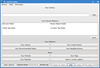
It has everything to satisfy your needs. Looks quite simple, but is very effective in functionality.
Hybrid stations
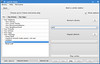
You can mix up up to three different stations, like your recommendations, Meat Loaf's similar artists and the contents of a plalist. Awesome feature!
Hybrid stations advanced
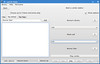
If you check "Show options" you can connect your selected stations with words like 'and','or' and 'not', so you could do something like "play my radio station and the chillout tag, but not Lady Gaga".
Now playing

Shows the currently playing track, has all needed buttons. Tag and share are inside the dropdown arrow at the lower right corner.
Station settings

More popular or more obscure? You decide. You cannot only select the popularity of the artists you want to to listen to, but also how often they should repeat(in percent).
The tagging window
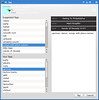
The tagging window is awesome, you can drag tags directly into the text box on the right. Too bad it currently always displays the wrong track.
About window
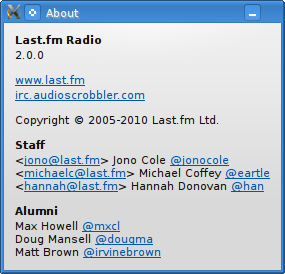
So do not tell me I would tell you fairy tales ;)
One word on functionality before finishing: The client is still pre-alpha, plaback often just stops, stays silent and then continues after a couple of minutes.
As I am a curious guy(especially regarding the API), I wondered about those lastfm://rql/somelongstring URL's in the console output and took a look at the source(horray to GPL :) ). What I disovered? Its the station url for the hyrbid stations...
This morning I was just wondering what to do with this wonderful day. So I had a great breakfast with some cooked eggs, a cup of coffee, some corn flakes, watched some TV and took a bath afterwards. But what to do then? Start a new Java project...uhm I coded all week long, but the sun does not shine that much outside.
So lets install the current last.fm client from github. At this point, a big green plus to the programmers at Last.fm for putting the whole last.fm desktop software of the git repository(which includes the radio player, too) under GNU General Public License. Thats awesome!
Looking at the Network graph, I saw that eartle has the most recent version. As I am not familiar to git yet, I lauched a console and typed "man git" and read the manual of git.
Afterwards I did
mkdir ~/lastfm

cd ~/lastfm

git clone git://github.com/eartle/lastfm-desktop.gitI read the README's, installed the missing packages and additionally I got liblastfm via "git clone git://github.com/eartle/liblastfm.git". I compiled the latter(you have to install some additional packages) and gave the last.fm client a try. It failed with an error that "boost" could not be found. I googled a bit and did
sudo aptitude install libboost-dev$ git clone git://github.com/lloyd/yajlThen I tried to launch "./_bin/radio", but it did not find some librarys. I guess the way I fixed it was really dirty(copied the required librarys to /usr/lib) and I will undo that and try a better way next time.cd ~/lastfm/lastfm-desktop
./configure
make
The client
From console, I ran
cd ~/lastfm/lastfm-desktop/

_bin/radio -stylesheet app/radio/radio.css &
It has everything to satisfy your needs. Looks quite simple, but is very effective in functionality.
Hybrid stations
You can mix up up to three different stations, like your recommendations, Meat Loaf's similar artists and the contents of a plalist. Awesome feature!
Hybrid stations advanced
If you check "Show options" you can connect your selected stations with words like 'and','or' and 'not', so you could do something like "play my radio station and the chillout tag, but not Lady Gaga".
Now playing
Shows the currently playing track, has all needed buttons. Tag and share are inside the dropdown arrow at the lower right corner.
Station settings
More popular or more obscure? You decide. You cannot only select the popularity of the artists you want to to listen to, but also how often they should repeat(in percent).
The tagging window
The tagging window is awesome, you can drag tags directly into the text box on the right. Too bad it currently always displays the wrong track.
About window
So do not tell me I would tell you fairy tales ;)
One word on functionality before finishing: The client is still pre-alpha, plaback often just stops, stays silent and then continues after a couple of minutes.
As I am a curious guy(especially regarding the API), I wondered about those lastfm://rql/somelongstring URL's in the console output and took a look at the source(horray to GPL :) ). What I disovered? Its the station url for the hyrbid stations...
Subscribe to:
Posts (Atom)